Social Media Safe Zones,
Aspect Ratios and Character Counts
Creating visuals for social media is about more than just getting the right dimensions – it’s about safe zones. Safe zones are the areas of an image or video that remain fully visible and unobstructed by platform UI elements or cropping, no matter where or how your content is displayed. Designing with safe zones in mind ensures your message isn’t accidentally cut off, keeping your brand looking professional and engaging across devices.

In this guide, we’ll break down the safe zone guidelines for major platforms – Instagram, Facebook, TikTok, and LinkedIn – and share best practices so your content always stays in the clear.
Instagram safe zones (posts, stories, and reels)
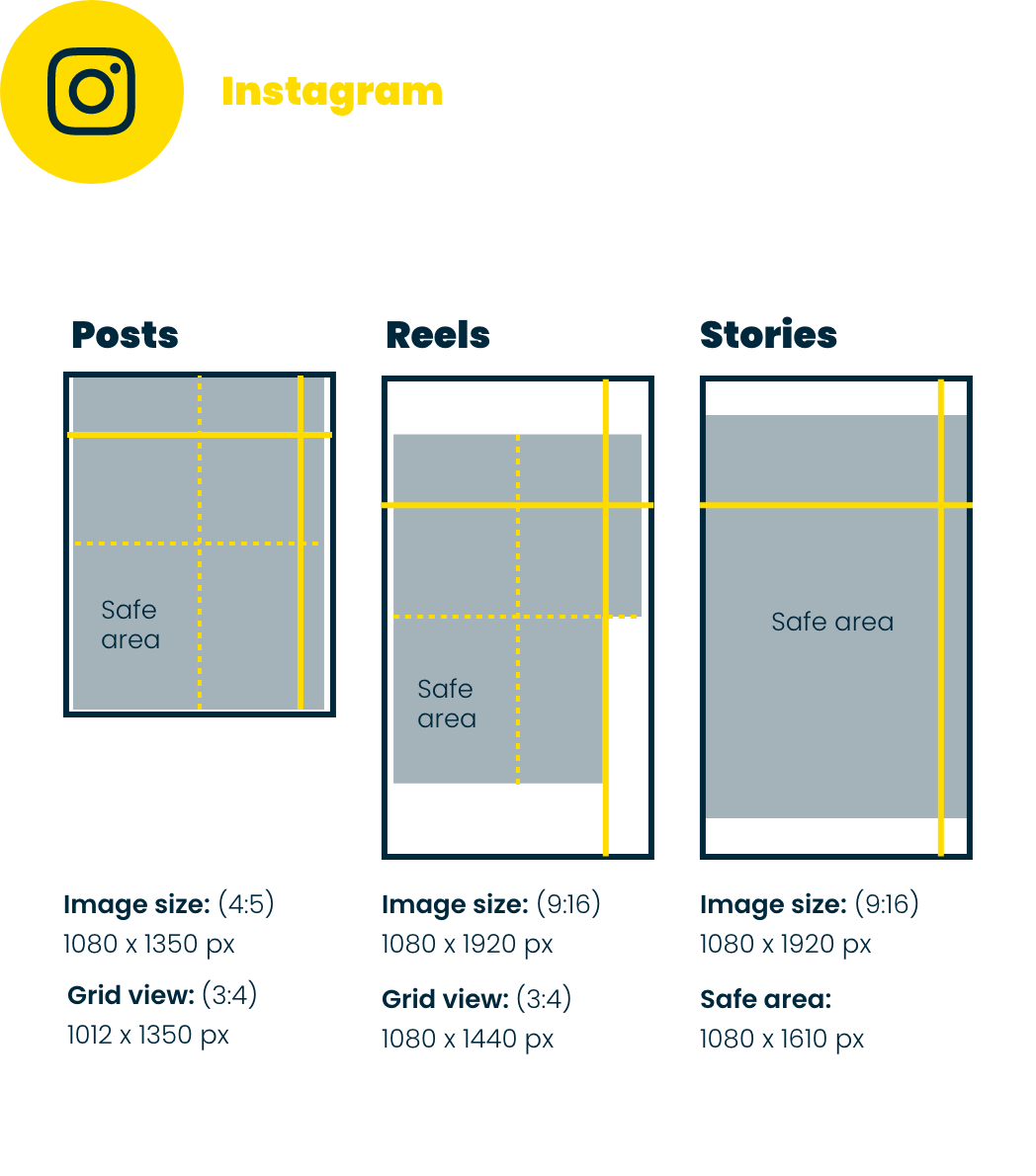
- Feed posts: Use 1:1 (1080×1080 px), 4:5 (1080×1350 px), or 1.91:1 (1080×608 px). Keep key content in the centre so it doesn’t get cropped in the profile grid.
- Stories: Full screen (1080×1920 px). Leave ~250 px clear at the top and bottom for UI overlays.
- Reels: 1080×1920 px. Avoid top 100 px, bottom 300 px, and side margins (60 px left, 120 px right) to keep subtitles and visuals visible.
By following these Instagram safe zone practices, your content will appear clean and fully visible across the feed, Stories, Reels, and grid. This should become part of your everyday social media marketing process.
Facebook safe zones (posts and cover photos)

- Feed posts: Stick to 1:1 or 4:5. Taller images will be truncated – keep text and logos higher up so they remain visible.
- Stories: Same as Instagram Stories – keep the middle ~1420 px clear for key visuals.
- Cover photos: 851×315 px. On mobile, only the centre 640×312 px is shown. Avoid the lower left where the profile photo overlaps.
With a little planning, you can avoid cut-off calls-to-action or cropped logos and keep your Facebook profile looking sharp.
TikTok safe zones (vertical video content)

- Top area: Leave ~108 px clear.
- Bottom area: Keep ~320 px free for captions and UI.
- Sides: Avoid the far right 120 px (icons) and give 60 px clearance on the left.
Designing with safe zones ensures your TikToks look clean and professional. If you’re using them for ads, consider working with us on YouTube video advertising too, so your vertical videos work seamlessly across platforms.
LinkedIn safe zones (profile banners and posts)

- Profile banners: 1584×396 px. Keep important content in the upper right, as profile pictures overlap the left on desktop and centre on mobile.
- Posts: Use 1200×627 px for horizontal images or 1080×1350 px for vertical. Allow for minor edge cropping in multi-image layouts.
Safe zones on LinkedIn help keep your profile professional. Combine them with a strong digital marketing strategy to ensure your message is clear and consistent.
Key takeaways
- Always centre important content.
- Learn each platform’s quirks and UI overlays.
- Leave breathing room around edges.
- Test on multiple devices before publishing.
- Stay updated on platform spec changes.
Designing for safe zones might feel like a detail, but it’s the difference between a post that looks amateur and one that looks polished. Safe zones ensure your creative gets seen – and that your audience gets the full message.
Need help? FizzyPop is here to make sure your social content not only looks good but works hard. Get in touch today and let’s put some fizz into your marketing.